Day 4 consisted of learning about artifacts generated by the system and users. Today we focused on two main areas: the Windows registry and Windows Event logs. For this post I will be mainly writing about Windows Events logs and Windows Event Viewer.
Windows Events Logs
Windows Event log provide a record of specific user and system action, to include logon/ logoff activity, account creation, start/stop status of services and more. The event logs are stored in a binary format and either needs to be viewed in a third party application or with Windows Event Viewer that come built into the Window OS as seen below.
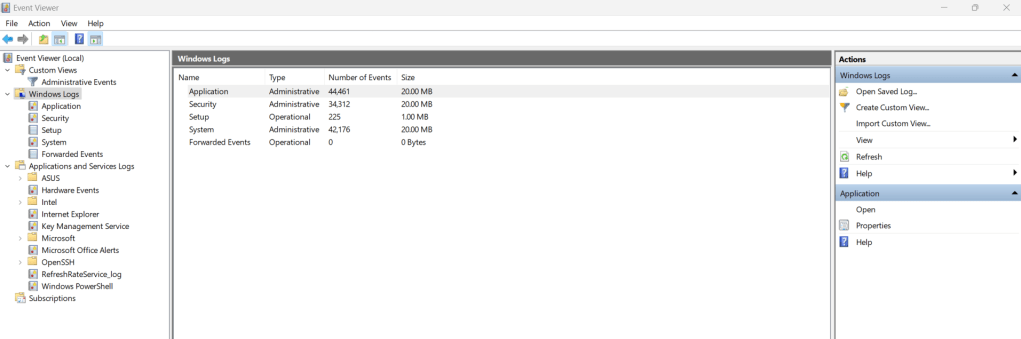
Event logs will display key information:
- The log name
- The source (the application or service reporting the event)
- Event ID (e.g. 4647 = user logoff, 4624 = user logon, 4625 = Failed logon attempt)
- The event level/type
- Date and time of when the event was logged
- Task category
- The computer name of where the event occurred

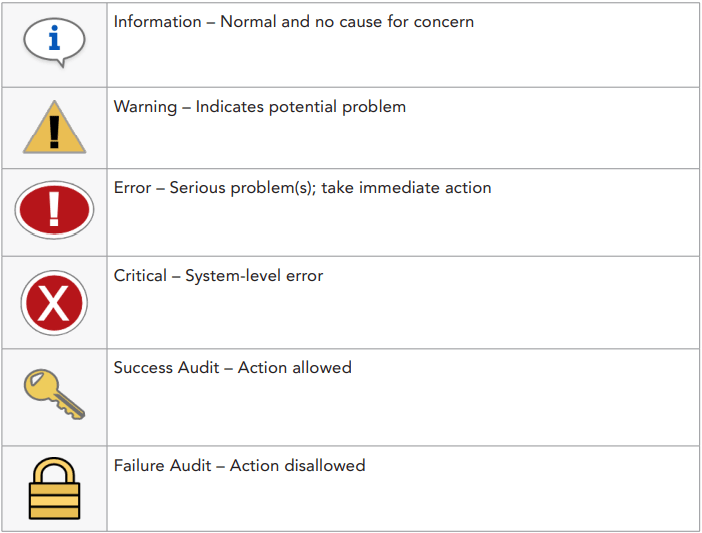
There are several different event types. See table below.
One of the interesting things I learned about Windows Event Viewer is that when the application opens a Windows Event log file it will adjust the times to the system time of the machine where the file is being opened. Say the log files came from a system that was set to Eastern Standard Time, if i opened those file on my system in Windows Event Viewer and my system is set to Universal Coordinated Time (UTC) then the log times will be displayed in UTC.
We also examined Windows registry files using Eric Zimmerman’s Registry Explorer and Magnet Axiom. I will be writing more about Windows registry files in the future. These daily post are just suppose to be a little snapshot of the things I learned during the course and the registry is something that I would want to take more time on.
 Yeah, I have a question...
One response to “Day 4 of Windows Forensic Examinations: Windows Events”
[…] Day 4 of Windows Forensic Examinations: Windows Events […]
LikeLike