Today I started the DoD Cyber Crime Center’s (DC3) Windows Forensic Examination (WFE) course. The plan is to document the things I’ve learned and share some of information that is covered in the course.
WFE provides training that enables professionals to conduct digital
analysis of Windows systems in a forensically reliable manner. Building on
the foundation of the Cyber Incident Response Course (CIRC), this course
introduces best practices and relevant technical aspects of Windows
forensic examinations. The course immerses students in mini-scenarios
that escalate in difficulty, allowing them to practice and reinforce what
they have learned while using trusted forensic tools, and provides a longform
practice that prepares students for the Capstone Exam.
COURSE OBJECTIVES
- Conduct a forensic examination of an image of the Windows
operating system in a forensically sound (repeatable, documented,
and non-destructive) manner - Choose the basic functions, configurations, outputs, tools and
settings that need to be adjusted when conducting a forensic
examination of a Windows operating system - Examine a forensic image from a Windows computer using basic
forensic processes and automated tools - Use tools and a repeatable, documented process to gain access to
protected files - Produce documentation that completely and accurately summarizes
all forensic actions taken on the machine
WFE is the third required course in a pipeline of four courses that will lead to receiving a certification as a Cyber Crime Investigator (CCI). Also, with the completion of this course I will receive a certification as a Digital Forensic Examiner through DC3.
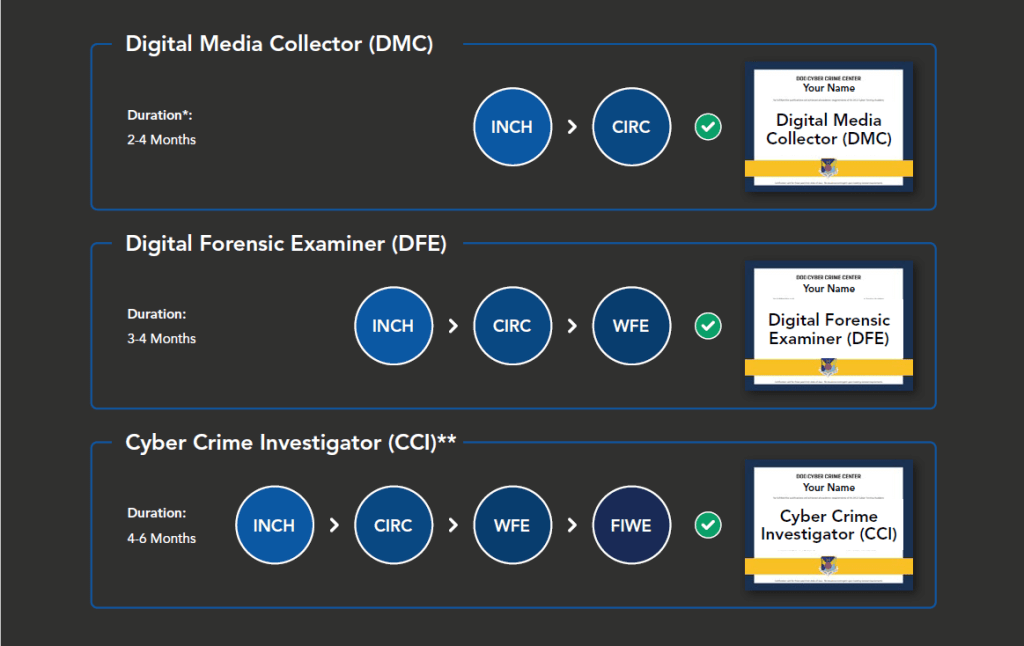
*Introduction to Networks and Computer Hardware (INCH), Cyber Incident Response Course (CIRC), Windows Forensic Examination (WFE), Forensics and Intrusions in a Windows Environment (FIWE).
Day 1 of this course served as an introduction, building upon the foundational knowledge gained from the prerequisite course, CIRC. The day was structured around three key lessons: Foundational Forensics, Setting Up the Forensic Workstation, and Case Creation in Magnet Axiom.
Foundational Forensics explored essential concepts like forensic documentation, the Daubert standard for legal admissibility of evidence, and how legal regulations influence evidence collection.
We also covered the forensic workstation—a dedicated computer designed solely for forensic examinations, including forensic acquisition and analysis. During this lesson, we delved into best practices for configuring a forensic workstation:
- Initiating each new case with a clean OS installation
- Isolating the system from the internet (employing an Air Gap)
- Setting the system clock to Coordinated Universal Time (UTC)
- Maintaining cleaned partitions specifically for evidence files
- Utilizing trusted, verified tools
- Performing a malware scan before starting any examination
Setting Up the Forensic Workstation and Case Creation in Magnet Axiom provided hands-on experience. We set up our forensic workstations, which will be in continuous use throughout the course. Additionally, we created a case in Magnet Axiom, processed an image of a hard drive, and examined various methods for viewing artifacts within Axiom.
This was just the first day of a 10 day course and I’m excited for what we are going to be learning tomorrow.


2 responses to “Day 1 of Windows Forensic Examinations: Forensic Fundamentals”
[…] Day 1 of Windows Forensic Examinations: Forensic Fundamentals […]
LikeLike
Curso interesante, cargado de contenidos y conocimientos. Gracias por compartir.!
LikeLike