Day 2 of the DoD Cyber Crime Center’s Windows Forensic Examinations course covered the Windows boot process, the different file systems associated with Windows, Endianness, the Master Boot Record (MBR) and the Globally Unique Identifier (GUID) Partition Table.
I want to focus on the MBR, we spent a lot of not only learning about it but also analyzing it using the HxD hex editor.
What is the Master Boot Record?
The Master Boot Record stores vital details regarding the disk’s physical organization and plays a crucial role in the initial booting process of the operating system. It holds the partition table that outlines how the disk is divided into partitions, alongside executable code that helps launch the operating system by handing control over to its bootloader. This setup ensures that the operating system starts up correctly from the hard drive, making the MBR essential for the computer’s operation right from the moment it is powered on.
The MBR contains these substructures
- Master boot program (Byte 0-439)
- Disk Signature (Byte 440-443)
- Master partition table (Byte 446-509)
- 2 byte “end-of-sector” marker, 0x55AA (Byte 510-511)
Below is a MBR in HxD hex editor. The highlighted areas represent: Blue = Master boot program, Yellow = Disk Signatures, Purple = Master partition table, Red = End-of-sector marker
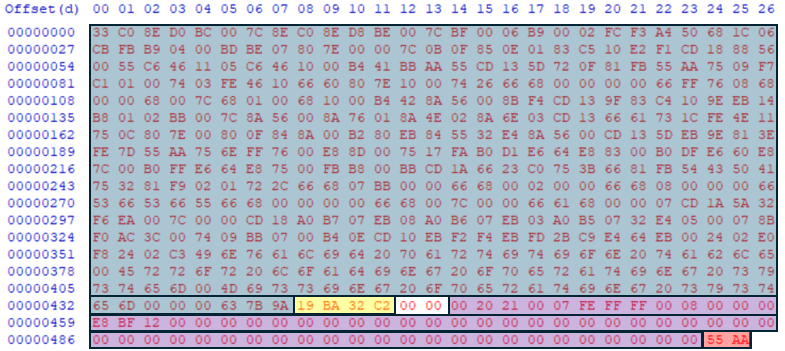
We also used HxD to examine the master partition table. From the hexadecimal of the master partition table we were able to find the sector that the each partition started at and the length of each partition. We were even able to identify the type of file system was on each partition.
Today was a fire hose type of day but the information that is being taught is worth learning and the instructors are doing an amazing job helping everyone understand these different concepts.
 Yeah, I have a question...
One response to “Day 2 of Windows Forensic Examinations: Master Boot Record”
[…] Day 2 of Windows Forensic Examinations: Master Boot Record […]
LikeLike