Day two, we covered the Master Boot Record. Day 3 was mainly about the Master File Table (MFT). The MFT not only serves as a robust source of evidence but also aids in validating the accuracy of data retrieved by forensic tools.
The Master File Table
The MFT is a unique file to the New Technology File System (NTFS), that contains information about every file location on the volume. The MFT is located at the root of the drive and is used by the file system to quickly locate and maintain data. Generally the size of the MFT is about 12.5 percent of the total size of the volume.
Below is an example of a MFT record that I will briefly go over there is a lot to point out on this record but I am only going to go over a few of them.
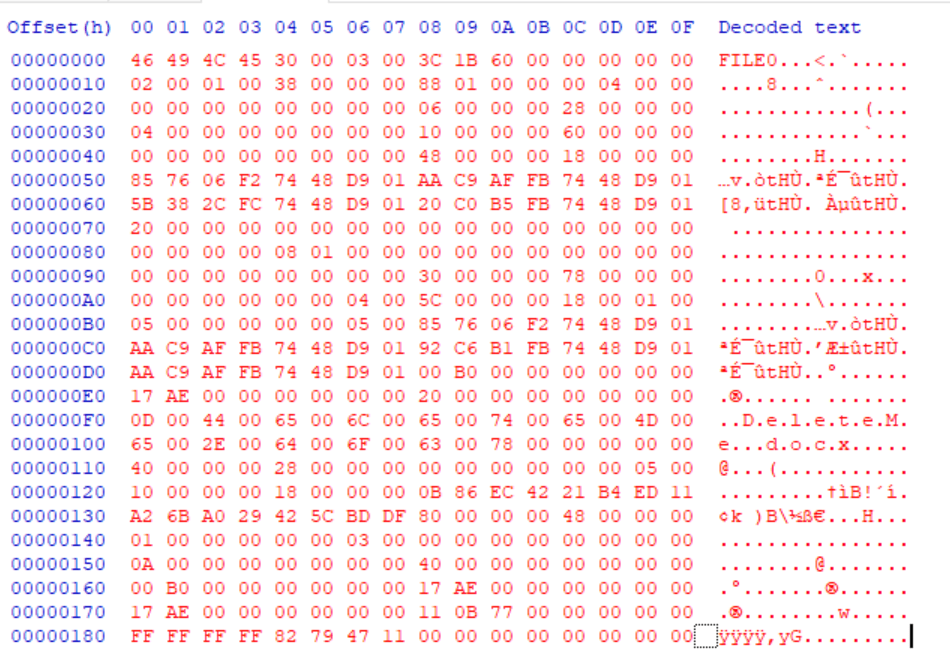
The first four bytes (46 49 4C 45) represent the Record Signature. If the FILE ASCII is display like it is below, that means that the file is intact. Otherwise, it will display BAAD.

At 0x16 (the highlighted area), the two bytes are used to indicate the allocation status where 00 00 = Deleted file, 01 00 = Allocated file, 02 00 = Deleted Directory, 03 00 = Allocated Directory. For the record we are looking at, we are looking at a deleted file.

Within this record we can also find the file’s created time, modified time, last accessed time and more.
We also manually carved the deleted file from the image of the data source, learned about common file signatures that are used to identify different file types and the created and compared file hashes using Hashdeep.
 Yeah, I have a question...
One response to “Day 3 of Windows Forensic Examinations: Master File Table”
[…] Day 3 of Windows Forensic Examinations: Master File Table […]
LikeLike